
Note:The Free and Commercial hyperlinks above will take you directly to DWfaq.com's store where you can read about my extensions. The Cartweaver links below will take you to their website. If you'd rather stay on this site, be sure to read my message where you'll find links to brief descriptions for your convenience.
Note: I only wrote the extensions for Cartweaver 3 for Application Dynamics Inc., not the application itself.
Note: The links below are only the most recent titles that I've been involved with. Follow the links below to visit the official book website.
Warning: Some of the images in the Medical section section are very graphic in nature. If you cannot stand the sight of blood, it is advised that you skip these images.
All ImagesOsteochondroma
|
If you've ever researched ColdFusion AJAX security features such as VerifyClient() or secureJSON or secureJSONPrefix, you've probably come across Ray Camden's article already (or one of his blog posts about it) but in case you haven't, before you continue I want you to at least read this post from Ray. (If I hadn't read Ray's postings I wouldn't have been able to come to the solution I'm going to tell you about without more effort. So thanks Ray!) Now, with that out of the way...
I'm using both some custom AJAX and some built-in ColdFusion AJAX goodness on a client's website. I only want AJAX calls to be able to get data from a particular page. Otherwise, I want to return a blank page to the user. In other words, I don't want someone browsing directly to callbyajax.cfm.
Now we all know that URL parameters can be hacked, but in my client's case if someone manages to pass in valid params that will get them results and they can bypass ColdFusion's VerifyClient() too, then that's good enough for me. With that in mind, my ideal solution would allow me to still use VerifyClient(), even though I'm using custom AJAX. So how can I make that happen?
Once you know that all VerifyClient() is doing is looking for a valid URL._cf_clientid, then it becomes a matter of passing in a valid _cf_clientid. The next thing that comes to mind is, "How can I get that value on my own so I can use it?" Unfortunately it wasn't as simple as I hoped... To my disappointment, the value used for _cf_clientid isn't anywhere to be found in the Client or Session scopes.
Something generates the parameter and the output looks something like this: ?_cf_clientid=C56E92048D21B1B348A3D097D842866B. I could only conclude that ColdFusion was using some sort of encrypted value and it didn't seem there was a way to access it natively. I was stuck. So I turned to my wonderful husband Dan who happens to be a ColdFusion genius, for some help and brainstorming. (Thanks for your patience Dan!)
Dan noticed that the URLs generated by native ColdFusion AJAX calls use some global JavaScript variables that ColdFusion sets right after the opening <head> tag. So Dan suggested that I use <cfajaximport tags="cfdiv" /> to force my page to write the global variables so that I could references them much like ColdFusion does. I didn't like that idea, mostly because importing tags I didn't need seemed wasteful. Once I got over trying to find a native way to get that same string of alphanumeric characters, I decided I should probably think about Dan's suggestion some more. I recalled recently seeing an example somewhere (though I can't recall where), that showed <cfajaximport /> without the tags attribute. Turns out, the tags attribute is optional, so I only had to use <cfajaximport /> in order to render the globals to the document. Ok, that feels a lot less dirty to me; I can live with this workaround.
Here's a simple proof of concept (by no means perfect) for you to view in the browser: VerifyClient.cfm. Notice the comment in the source code that points out that the globals were generated by using <cfajaximport /> at the top of the page. Here's the ColdFusion Code in the file that it links to (which is supposed to be called via AJAX, but faked for proof-of-concept purposes):
<cftry>

  <cfset VerifyClient() />

  <cfcatch>

NO!<cfabort>

  </cfcatch>

  </cftry>

  YES!
The beauty of this solution is I can now use one file for both custom and built-in AJAX functionality and still use VerifyClient().
Don't forget: You must enable client or session management in your Application.cfm or Application.cfc file for VerifyClient() to work at its best. Without client or session management enabled, VerifyClient() will not throw an error if URL._cf_clientid exists. (Empty values and bad values will pass, but missing _cf_clientid entirely will throw the expected error.)
Sidenote: I ran a test to see if I could get away with passing _cf_clientid via the Form scope instead of the URL scope. No luck; ColdFusion is only checking for URL.
Posted by ~Angela | Comments (0) | Add Comment | Permalink
Perhaps the most unhelpful error message of all time: Parameter incorrect. That's the error message that only a handful of Dreamweaver users were experiencing when trying to install Cartweaver3PHP.mxp version 3.1.13 into Dreamweaver CS3 or Dreamweaver CS4. Originally, we were getting reports of this issue from Vista users. We thought for sure Vista was the culprit. Eventually someone reported having the install issue on Windows XP. Most people had no problems installing the extension on both Vista and XP, yet for a handful of users the install would only fail. Since it wasn't just Vista anymore we could conclude that it wasn't a simple Windows OS issue, so what was it?
As the sole extension developer for Cartweaver, it was my job to figure out why this was happening. I turned to Tom Muck, PHP developer for Cartweaver, for some advice since he happens to be a long-time Dreamweaver extension developer himself. Tom gave me a few ideas to look into and we both tried to help customers with the usual extension trouble-shooting methods. Unfortunately none of our suggestions worked for our customers.
Debugging this issue was difficult to say the least, particularly because none of the Cartweaver team could duplicate the problem. If you're a programmer, you know that it can seem nearly impossible to fix something if you can't make it happen yourself. Similar to how one might debug a website having an issue, we had to determine what the customers who were experiencing the problem had in common with each other. I also had to try and determine what they didn't have in common with the people who had no trouble installing the extension. Usually this sort of approach proves fruitful and the issue can be narrowed down to some difference between systems. In the case of extensions, it is often another installed extension that's causing the conflict. I carefully compared lists of installed extensions between users who had the issue and did not find any conflicts. I was stumped.
Lawrence (founder of Cartweaver & owner of Application Dynamics Inc.) put together an email list for people having the issue who were willing to volunteer to help figure this out. One volunteer noticed that the install process writes files to the TEMP directory, and he pointed out that he believed it stopped writing files at a specific file. Once I heard this, I thought there could be some meaning there but couldn't find anything wrong with the last file that got written, the file directly before it, or the one that should have been written next.
The last time a strange error happened in one of my extensions, it was due to a line break in JavaScript (which was 100% legal). Was this another case of whitespace in a file causing an issue? I'd go insane trying to find a stray whitespace -- especially since I was never able to duplicate the issue on any of my configurations. I'd likely drive our customers to madness by asking them to retry a billion times. I was not a happy extension developer.
Lawrence and I talked about it some more and decided to just try and repackage the extension and see if that worked. I was afraid that if it did work, we'd never know why the issue happened and it might happen again in the future. A part of me hoped it worked so I could make customers happy, but part of me wanted to know the reason the MXP wouldn't install so that I could make sure it never happened again. I tried packaging it on several different systems with several different versions of the Extension Manager. It was always the same result; the extension worked for all of us at Cartweaver but our volunteers still couldn't install it.
I'd asked our volunteers to send me their TEMP files and I started taking a closer look at their files. I stared at the files in Beyond Compare for what felt like days. I could not find a problem anywhere. Why though, were both of their systems stopping at a specific file? There had to be something wrong.
I was staring at the files in Windows Explorer and noticed something odd. The file's Last Modified Date was listed as December 31, 1969! How strange. I checked the file on the Mac in Finder and it was December 31, 1903! As it turned out, the file was missing a Creation Date even though it had a Last Modified Date. As you may have guessed, that was the cause of the install issue all along.
One part of this issue remains a mystery to us still. Why in the world did only a few people have the problem and not everyone? My guess is AV software or security setting were somehow set to not allow files without a creation date to be written, but that's just a wild guess. If you know the answer, be sure and let us know as it'd be nice to know.
Thanks to all the Cartweaver 3 PHP customers who experienced the issue for being so patient as we worked to resolve the issue. Hopefully I'll never encounter anything this difficult to track down again!
Posted by ~Angela | Comments (0) | Add Comment | Permalink
If you haven't read Part 1 yet, this post won't be near as interesting...
One month after the egift card ordeal, I got the email! I got two emails actually. The first one looked very similar to the second, the difference being the first email was to notify me that the email had been sent to the egift card recipient. In this case, that was me.
Here's what the egift card email looked like. (I've blurred private info and the Victoria's Secret model so that they don't ask me to take the image down.)

You may be thinking there was a date for delivery box somewhere that I filled out that caused the email to be delayed for a month. Nope.
Keep in mind that I was issued a refund on March 25th. I have to wonder if the egift card is still valid.
Posted by ~Angela | Comments (0) | Add Comment | Permalink
On the 14th of March I logged in at victoriassecret.com to purchase an E-Gift Card for someone. The checkout system needed to know who I wanted to send the email to. Since it was a birthday gift, I didn't want them to get it ahead of time. I was also concerned that they may never receive it at their Yahoo email address. So, I used my email address because I knew I'd get it since I have never had an issue receiving email from victoriassecret.com in the past.
The next day, the email for the E-Gift card was still not in my inbox. I emailed them a reply to my order confirmation email and this is what I got back:
Not enough info? I provided my entire order confirmation email. So I emailed them again at about 7pm on the 15th:
Still no E-gift card in my inbox. Instead I get this lovely reply at about 10:30pm on the 15th:
I'd already looked up my order history to see if I could glean anything from that. Nope, nothing. I couldn't see what email address I'd put into the form at checkout or any of the recipient's details. Had I misspelled my own email address? Entirely possible. I emailed them again at about 8:30pm on the 16th:
Hoping for the best I waited for a reply. I waited. I waited some more. By 10am on the 18th still no e-Gift Card and no email reply either! Ugh, I emailed again:
I finally get a reply at almost 4pm on the 18th:
As soon as I received the reply, I responded which was about 7:30pm on the 18th:
Yeah, I'm getting annoyed and a tad snarky. I've had a different Customer Service Rep reply to each of my emails. I'm convinced none of them read the history. Of course, I get a reply from a different person, this time at nearly 10am today (which is the 19th):
Now I'm even more annoyed. She didn't answer my question. So I reply at about 10:30am today.
A nice and quick reply that was actually from the same Rep. as the previous reply came in at about 10:45am today which said:
Hmmm, okay maybe I did type it in wrong? That doesn't make sense, but alright... Why can't they just tell me the email address I entered originally? I'm getting frustrated again, so I write a short email at 11:29am today:
The same Rep. replied again at 11:34am today:
Fine. I give up. I'll call customer service. (I think it is lame that they say to call and in the next breath say I can email. I don't like calling and wish I could do it all in email.)
So here's how the call went... First, the recording states the call may be recorded for quality assurance. Good! I'll let my frustration show so maybe they'll fix this terrible user experience.
The woman who answered was very nice and polite. Based off the phone number I was calling from she already had some of my info in front of her. (That's always a little creepy to me, but cool at the same time.) I explained to her the situation, making mention of how I was not able to get the email address the E-Gift card was originally sent to. She explained that "for security purposes we can't email that information".
WHAT?! I'm the one who placed the order. I can't get that information in my order history or in the email but I can call and get it? It's easier to fake who you are by calling than to prove you're legit by replying from the expected email account or logging in to the website. In my mind, the phone is less secure, but she gave it to me and it was correct. I complained they should at least have said in the email, "For security purposes" etc. I would have called sooner.
She then proceeds to ask me, "Was this a gift?" I said yes, and explained my reasons for having it sent to my email. She then let me know something I never would have expected. She said that the recipient would have to log in from or create an account with my email address in order to redeem the gift card! WHAT?!!!
It's an E-Gift card, should be as simple as entering in a code at checkout to redeem like any other gift card. Right? Yeah, I would think so too but that's not how they do it.
Over the course of my call I gave the lady an earful I'm sure. All the while she was patient as she could be and said she'd pass my frustrations/suggestions along. I'd suggested that the order history let me see who I was emailing to & their email address. I also told her that it isn't that hard for them to do this, and that I would know because I build websites for a living. I even told her I'm not some idiot off the street who doesn't know how these things should work or how they work, that she could Google my name and find out who I am and that I know what I'm talking about when I make these suggestions.
Sidenote: Yikes, I'm not proud of that attitude and I'll probably never be hired to work at VictoriaSecret.com (they're a ColdFusion site and I'd love to work for them to make their site so much better, but it is more unlikely now than ever -- not just for this call but also because of this blog post. Oh well... back to my story.)
In the end, I asked for a refund and she was able to do that quite quickly. I asked her how I could get a gift card that would be usable online. My options were to buy one online and wait 7 to 10 days or get one in a store. Either is usable online.
I thanked her for putting up with me and apologized, "I'm sorry for taking my frustrations out on you. I know how hard it is to be in Customer Service. I hope I didn't ruin your day." She was polite, but I'm sure she was frustrated dealing with me. I honestly feel bad for that.
In the end they'll still get my money. I'll be placing an order on behalf of the gift recipient later tonight. I just can't and won't likely ever buy an E-Gift card because: A) I never got my email and there's no good reason for why I didn't B) I can't have it sent to myself and then print it out and give it to someone or forward it to a friend's email. That's why I think VictoriasSecret.com's E-Gift cards suck. Hopefully my feedback will be received and they'll improve the process. Not that I'll ever know unless someone tells me, since I've no intention of ever buying an EGC from them again. THE END
Posted by ~Angela | Comments (0) | Add Comment | Permalink
This Saturday was the Blue & Gold Banquet, where Cub Scouts receive the badge that they've been working towards. My son, Gaetano, received his Bear badge!
When the scout receives his badge, their Akela (that's me in my son's case) pins the badge upside down over their left pocket (close to their heart). When the scout does his first good deed he can turn the badge right side up and it can be permanently attached to their uniform.
Gaetano was with us shopping at HEB and a bunch of those yellow coupons you see hanging everywhere had fallen and scattered on the floor. We were busy shopping to notice them, but Gaetano saw them and picked them up and put them all back on the hook.
At first, I thought he'd knocked them down and was just cleaning up after himself. I was ready to scold him for touching them in the first place but he told me they were already on the floor and he was just picking them up. Awwww, he did a good deed! :-) Tonight, I'll have him help me put his patch on his uniform.
The following are some statistics from the back of the program from the Blue & Gold Banquet that I thought you might find interesting. Keep in mind that Gaetano is a Cub Scout, not a Boy Scout. Gaetano is a Bear now, and has Weblos 1 and Weblos 2 to complete before entering the Boy Scouts in the 6th grade. As you read through these facts, keep in mind that with every year that passes in scouting, the next level brings more advanced achievements and greater commitment.
Gaetano tells us that he'd like to go all the way to Eagle Scouts. I would be so proud. As his Akela, I promise to do my best to help him reach his goal.
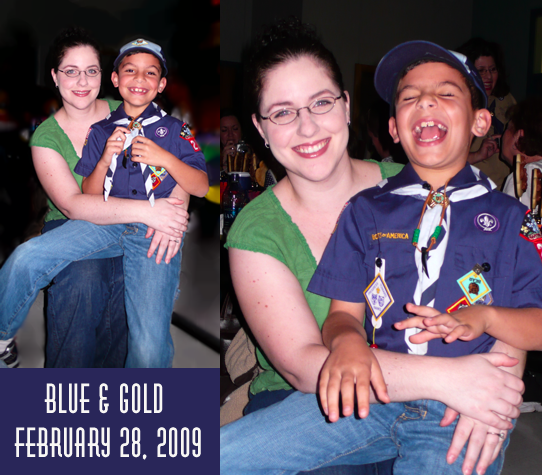
Though Gaetano looks like he's laughing in the photo on the right, he's actually doing his impression of his sister crying like babies do. That's my goofball! I love my Bear cub and look forward to more good times with scouting.
Posted by ~Angela | Comments (1) | Add Comment | Permalink
Back in March 2005 I blogged about discovering my son's allergy to artificial color. It was a brief entry stating I had a suspicion and would be taking him to see an allergist to confirm my suspicions. Today I’d like to finally follow up and get this out there for other parents who may have children with this allergy.
When Gaetano was 4 years old, he'd had a chronic cough for nearly 2 years. He had multiple ear infections as well and the doctor said that if he gets one more ear infection we would need to put tubes in his ears. The poor little guy was constantly congested but I didn't know why. I've been congested most my life, so I figured it may be bad genes, but I hoped to find a different reason.
Gaetano would get a fever and I'd give him Children's Tylenol for it. Most of the time he threw it up right away. Sometimes he'd throw up later. Either way, I'd blame the vomiting on the fever or illness itself.
It was the same way for antibiotics; he would get a pink colored Amoxicillin and he'd throw that up too. Again, I'd blame the illness or fever. He'd get better, but not as quick as I thought he should for being medicated. It almost always felt like illnesses had to run their course and that medicines didn't really help.
In between being sick, when he was more healthy than not, he was still congested and coughed quite frequently. I took him to the doctor to see what was wrong.
The doctor tried to tell me he was asthmatic and gave him Abuterol (which I've since learned contains yellow #6) for his chronic cough. It didn't help. I knew it had to be something else and figured it was something he was allergic to. I didn't know what that allergy might be. Was it the old carpet in our house? Was it all his stuffed animals he'd drooled on for years? Was it some other environmental cause that I didn't know about? I looked for every possible cause I could find -- I didn't want him to be asthmatic and suffer with that all his life.
From time to time, Gaetano would spike a fever and throw up but had no other symptoms that were noticeable. It could have been that he wasn't very talkative being only 4 years old and not having the words to express how he felt. It could be that he really had no other symptoms. I'll never know for sure.
Every illness (for lack of better term) which happened seemed to have a decent explanation of its own. Yet somehow I knew that there had to be some common thread. Maybe it was my maternal instincts, maybe it was my analytical nature at play, or maybe it was neither. It just seemed logical to me that there could be something making him sick and I just didn't know what it was.
I started trying to keep a mental note of what he ate before he threw up to see if maybe it might be something of a gross food combination that would naturally upset anyone's stomach. (You know, like milk and orange juice together.) Sometimes I had to figure out what he'd eaten by what came out of him... I started to notice that every time he puked it was pink.
Looking back through my blog, I see that I never wrote about taking Gaetano to see an allergist. Well, I did that and found that there isn't a prick test for artificial color. He was given a prick test anyway and turned out he wasn't allergic to anything that he was exposed to at home or daycare.
I learned that the only way to test for an allergy to artificial color was to remove it from the diet for 3 full weeks before re-introducing it to the diet. If he gets ill, it is fairly safe to assume that the dye was the cause. You should then wait for the reaction to clear up and then 3 weeks after that you can try introducing the artificial color once again. We did this several times, sometimes without my own knowledge...
Most of our family thought that I was just being a health nut or overprotective, that there's no way that artificial color could possibly make anyone sick. Some thought, "a little won't hurt", while others simply didn't believe it at all.
At the time, I was going through divorce and Ambrogio (my ex-husband) didn't think there was anything wrong with our son. Ambrogio just figured I was trying to be controlling since I was "picky" about Gaetano's diet from the time he started eating solid foods. (I made all his baby food from organic vegetables.)
It wasn't until family members gave Gaetano foods with artificial color without telling me first that they believed me. It's pretty convincing when you give him something with red dye in it and he pukes in your car!
It took a few months to get everyone else who cared for him on board with checking every label. There were many "accidents" and those responsible always said things like, "It wasn't that much.", "I'm sure he'll be fine.", "It wasn't red, it was just yellow #5." It was infuriating at times to say the least.
Months later, I'd finally gotten Gaetano off all artificial color for a full month and his cough was much better. He was generally much better behaved too. We thought that was just because he was getting older but I've since learned that some children react to artificial color with bad behavior (or hyperactivity).
He got sick a few times the year following, and we came to discover that there's only one liquid antibiotic that did not have artificial color in it. One. That's right; just one. (It was an Amoxicillin, but I can't recall exactly what it was called right now.)
The doctor said that since there's only one antibiotic he could have, it was important to keep him healthy since he could build an immunity to it. Though there would be ways to get around that issue, it would be a major hassle he explained. So, I did my best to keep him healthy as I could.
A year later Gaetano was much healthier over all. He wasn't congested anymore and hadn't gotten any more ear infections either. (Yay, no tubes!)
Over the years there have been several slip-ups where he's had artificial color. In kindergarten it was orange iced cookies for Halloween that some parent told him it was okay to eat even though he said he couldn't have it. He trusted them. In first grade, there was a similar instance. There've been plenty of other times where he was given something either accidentally or carelessly over the years.
From time to time we run into people who don't believe his allergy is real. They think I'm nuts. Most people are understanding thank goodness. However every now and then someone will try to tell me that a "little won't hurt" and I just stand my ground. Most of the time saying something like, "Well if you want to clean up his puke then by all means give him a little!" convinces them enough not to give him anything he shouldn't eat.
Gaetano's had a rough time of it in the last couple years because kids at school can be so mean at times. Some have teased him that they have certain candy and he can't have it. For the most part, he handles it pretty well. Sometimes it gets to him and he says to me things like, "Mom, do you hope that I grow out of my allergy some day?" or "Mom, can we just test it and see if my allergy is gone yet?"
To make Gaetano feel better, I try to buy everything red that I can for him to eat that is all natural. (I know he's allergic to the other colors, but red is the one that makes him puke.) I buy all sorts of great treats from Whole Foods for him because I know that shopping there is safe. I've made homemade candy corn, bubble gum and marshmallows for him and they're even better than store bought junk! Luckily there's very little that I can't find an equivalent for, so he doesn't feel left out.
Why am I writing all this after so long? The answer to that is soon to come. (Hang in there; I know this is a long blog post!)
Last night, we were eating at a restaurant and the server offered us some "all natural" black cherry soda. I asked the waiter if he was sure that it was all natural and told him my son is allergic to artificial color. He said it was all natural except that it had sugar in it. I commented to him that sugar is natural, and he said that some people complain because it has sugar in it. That should have been my tip-off that this guy had no clue, but I trusted him.
Half way through drinking the can of soda that the waiter had poured into a glass, Dan started to read the can's label. You can see where this is going... Red #40 was the final ingredient. Dan & I did our best to not make a big deal out of it and let the waiter know.
In short, I didn't like how the waiter handled the situation. I found him rude as soon as he said, "I told my manager and he said it only has a couple of drops of Red #40 in it." I decided against talking to the manager at that time because I didn't want to make a big deal with my son there. (The waiter offered me the chance to speak to him now or I could call him later. For some reason, he insisted that if I was going to talk to him it had to be now, not after our meal. It was very awkward.)
I was as nice as I could be about it, letting him know that I just thought he should know so he didn't tell people it was "all natural" anymore. I told him that I didn't blame him, that I should have checked the label. He didn't seem to believe me. Despite the awkwardness, we ordered dinner and did our best to enjoy the meal.
Gaetano seemed a little concerned that he might get sick. I explained to him that he'd been wanting a test to see if he's still allergic. "Well, this is your chance!", I told him. I explained that if he didn't get sick from it this time, then maybe he's outgrown it.
I wanted to allay his worries and really let it be a true test. I knew that only some red wouldn't necessarily bring on fever and vomiting but I knew it would at least bring on congestion and possibly an upset stomach. I didn't tell Gaetano what I thought might happen.
I really wanted to talk to the manager on the way out (while Dan & Gaetano waited in the car), but I didn't. Having been a restaurant manager myself for some time I was mad that he didn't even bother to stop by the table. I knew that if I spoke to him it was not going to be pleasant. I saw the manager from a distance. He looked like he was a generally grumpy person. It would have been ugly... So we left.
About 45 minutes later I noticed Gaetano didn't look too good. I asked him how he was doing and he replied that his tummy hurts. I asked him when it started hurting and he said it'd been hurting since about five minutes ago.
I did my best to get his mind off of it, making him smile and laugh while being careful not to make him suspicious. He went to bed in a good mood and I hoped for the best.
At 3:45am I woke up with a massive headache. I'd been dreaming that Gaetano was sick and that I'd taken him to the hospital. The doctor said it wasn't his allergy, but it was stress due to the TAKS tests. I got out of bed and went to go check on Gaetano. He was sound asleep and didn't feel feverish. I felt relieved. Maybe he'd be fine. Maybe he's outgrown his allergy?
In the morning, Gaetano woke up and complained of a headache and tummy ache. I checked his sinuses and he seemed to be rather stuffy. Most likely a sinus headache caused by the congestion that ingesting artificial color causes for him. The verdict is that he's not over his allergy.
Gaetano was worried that he'd throw up at school because of his upset stomach. Dan & I tried to put his mind at rest and convince him that he's just worried about the TAKS (Texas Assessment of Knowledge And Skills) test tomorrow. I'm hoping that we were right.
I really hope he feels better. He needs to be feeling good for TAKS tomorrow. Having a bad day prior to the big test is sure to make him tired.
So there you have it; I'm writing this for two reasons. One is because I'm worried about my son since he had a dose of Red #40. The other reason is because I know that by sharing my story here on my blog it'll help other parents.
If you found this info helpful, or have a story of your own to share, please leave a comment. Thanks!
Posted by ~Angela | Comments (2) | Add Comment | Permalink
My membership in the 2009 Adobe Community Experts program has been renewed. Dan's has too. (He's sure got a way with words; I'm so boring.)
I'm honored to be part of the program. Thanks Adobe!
Posted by ~Angela | Comments (0) | Add Comment | Permalink

Comment from hinz on 2/20/2012
I was previously a scout, and it was a good time. well it is still something.